Stream Studio
A complete production suite for high-quality streams with actions, triggers, overlays, and integrations
Stream Studio is the heart of GEMTOK - a complete production suite for high-quality streams that lets you automate, customize, and level up your live broadcast.
If Soundboard and Classic Games are engagement tools, Stream Studio is the control center that connects everything together.
What is Stream Studio?
Stream Studio is a browser-based production dashboard that manages:
- Unified Chat - View comments from TikTok, YouTube, Twitch, Kick, Douyin in one overlay
- Real-Time Event Sync - Instantly sync follows, likes, shares, gifts across all platforms
- Automation - Actions & Triggers system to automate responses
- Production - Overlays, Sound Alerts, Text-to-Speech, Files Manager
- Integrations - OBS Studio, Streamer.bot, Input Binding, Run Command, Webhook, Game Mods
Instead of juggling 5 different tools, you control everything from one dashboard.
Core Concepts: Event → Trigger → Action
Stream Studio works on a simple but powerful logic:
- Event happens on your live (e.g., someone sends a Rose gift)
- Trigger checks if it matches your rules (e.g., Gift = Rose AND count >= 5)
- Action executes (e.g., Play sound alert + Show overlay + TTS "Thank you!")
You can chain multiple actions to one trigger for epic moments.
Key Features
1. Actions
Building blocks of automation. An Action is what GEMTOK does.
Types of Actions:
- Play Sound Alert
- Show/Hide Overlay
- Text-to-Speech
- Run Command (Windows Toolkit)
- Input Binding (simulate keypress for games like GTA V, Minecraft, Roblox)
- Webhook / Streamer.bot integration
- Switch OBS Scene
Learn more: Actions
2. Triggers
Rules that listen to live events. When conditions match, triggers fire actions.
Trigger events:
- Gift
- Follow
- Like
- Share
- Join Stream
- Chat comment (keyword filter)
Free: 7 Max triggers. Premium: Unlimited.
Learn more: Triggers
3. Auto Triggers
Advanced automation with timers. Perfect for:
- Auto shoutout every 10 minutes
- Play sound every 5 minutes to keep chat alive
Learn more: Auto Triggers
4. Sound Alert
Audio alerts for gifts, follows, etc. More powerful than basic Soundboard.
Free: 7 Max. Premium: Unlimited.
Learn more: Sound Alert
5. Text-to-Speech (TTS)
Turn viewer messages into fun automated voices.
- Multiple voices & languages
- Filter by keyword or gift
- Works with Unified Chat
Learn more: Text-to-Speech
6. Overlays
Stunning visual layouts to level up your broadcast.
- Chat overlay (unified chat from all platforms)
- Event list, goal bars, leaderboards
- Custom browser source for OBS
Learn more: Overlays
7. Files Manager
Central storage for all your assets:
- Sounds, images, videos
- Organize by folders
- Quick access from Actions/Overlays
Learn more: Files Manager
8. Integrations
Connect Stream Studio to your existing setup in one click.
Streaming Tools:
- OBS Studio - Auto switch scenes, control sources
- Streamer.bot - Advanced automation bridge
Game Mods:
- Minecraft, GTA V, RDR2, 7 Days to Die, Plants vs Zombies - Let viewers affect your game via gifts
Input & System:
- Input Binding - Simulate keyboard/mouse for any game (Roblox, Getting Over It)
- Run Command - Execute system commands, control hardware via Windows Toolkit
- Webhook - Connect to any external service
How to Connect
Stream Studio needs to be connected to your live stream to receive events.
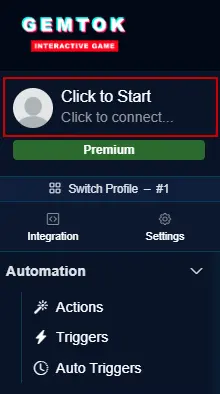
In GEMTOK dashboard, click the Connect button (top bar) to show connection modal.
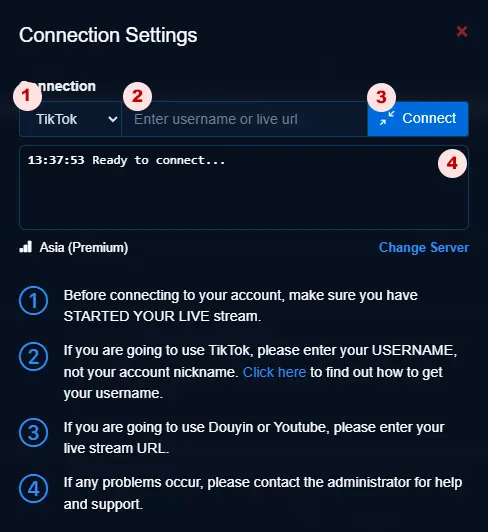
In the modal:
- Select platform (TikTok, YouTube, Twitch, Kick, Douyin)
- Enter your username or live URL
- Click Connect
- Check history for quick reconnect
For platform-specific guides (TikTok username vs YouTube URL), see How to Connect.
Quick Start Example
Let's create your first automation: Play applause when someone sends Roses
Go to Actions → New Action → Type: Play Audio → Select from library or upload your seound
Go to Triggers → New Trigger → Event: Gift → Gift Name: Rose → Action: Your applause action
Connect to your live and test by sending Roses (or use test button)
Now every Roses will trigger applause automatically!
Stream Profiles
Save different setups for different games or streams.
- Profile 1: Just Chatting (chat overlay + TTS)
- Profile 2: Gaming (game integration + sound alerts)
- Profile 3: IRL (minimal overlays)
Free: 2 Max profiles. Premium: 10 profiles.
Free vs Premium
| Feature | Free Tier | Premium |
|---|---|---|
| All Overlays | ✅ Included | ✅ Included |
| Text-to-Speech | ✅ Included | ✅ Included |
| External Integration | ✅ Included | ✅ Included |
| Desktop Integration | ⚠️ Basic Only | ✅ Full |
| Connection Cooldown | ⚠️ Every 15 minutes | ✅ Unlimited |
| Mini Games | ⚠️ Trial Only | ✅ Full |
| Classic Games | ⚠️ Trial Only | ✅ Full |
| Soundboard Auto Trigger | ⚠️ Manual Only | ✅ Unlimited |
| Sound Alerts | ⚠️ 7 Max | ✅ Unlimited |
| Actions & Triggers | ⚠️ 7 Max | ✅ Unlimited |
| Stream Profiles | ⚠️ 2 Max | ✅ 10 Profiles |
| Platforms | ⚠️ TikTok Only | ✅ All Platforms |
| Support | ⚠️ Documentation Only | ✅ Assisted via Chat |
See Membership for upgrade.
Best Practices
- Start simple - 2-3 triggers first, then expand
- Use cooldowns - Prevent spam (e.g., 5 sec cooldown per sound)
- Test offline - Use preview/test buttons before going live
- Organize files - Use folders in Files Manager
- Combine features - Trigger = Gift, Actions = Sound + Overlay + TTS + OBS scene switch for maximum impact
- Backup profiles - Export your profiles regularly
Troubleshooting
- Not connecting? See Stream Connection
- Sound not playing? See Sound Not Played
- Game paused? See Game Paused
Stream Studio is where your creativity becomes automation. Open it now at gemtok.live and build your first trigger!